SUMX DAX Function in Power BI
The SUMX function in DAX is an iterator that evaluates an expression for every row in a table and then sums the results. Unlike the standard SUM function, which only works on a single column, SUMX allows you to perform complex, multi-column calculations (like Price * Quantity) at the row level before aggregating the total. This is essential for accurate financial reporting and advanced data modeling.
DAX Syntax SUMX(table, expression)
The function has the following parameters:
- table: The table containing the rows for which the expression will be evaluated. The table can be a table-expression.
- expression: The expression to be evaluated for each row of the table.
How it Works: Row Context
SUMX creates a Row Context. It goes through the table row-by-row, calculates the expression, stores that value in temporary memory, and finally adds all those stored values together.
Example: Create a measure.
DAX
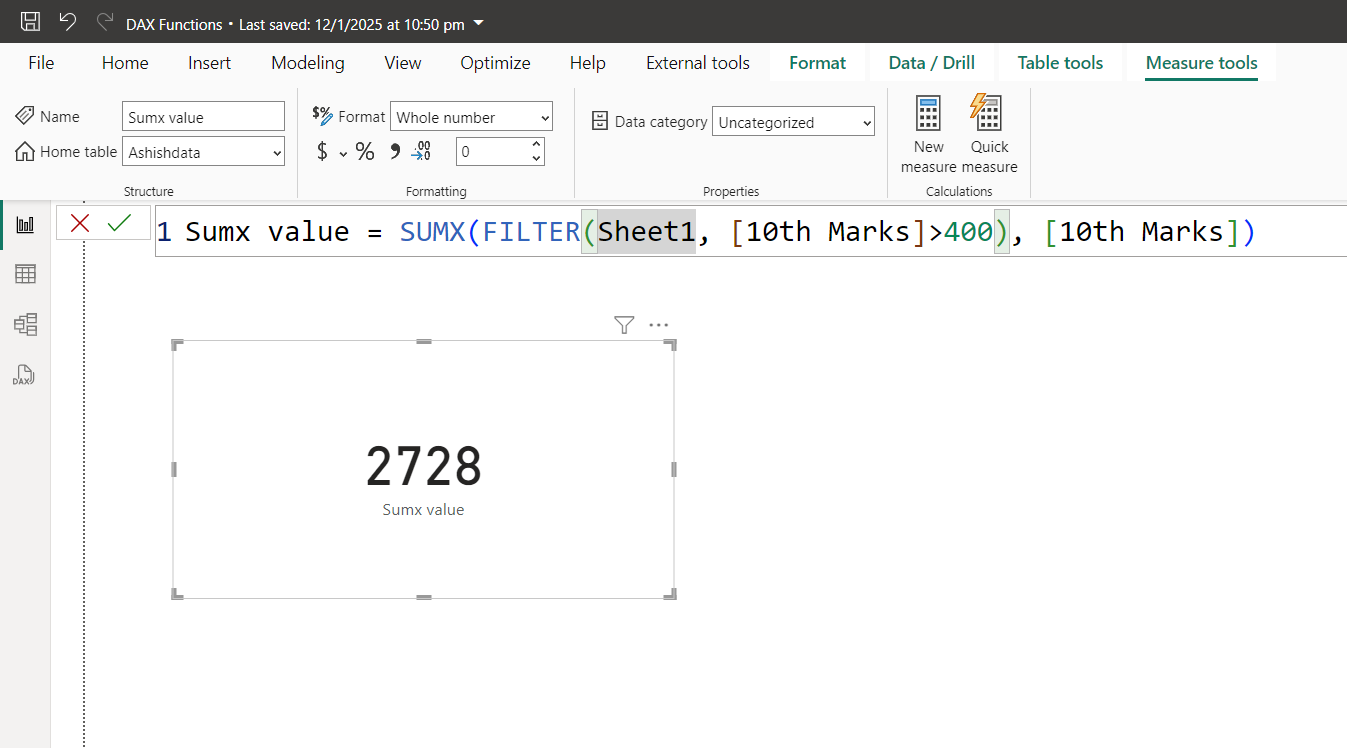
This DAX expression calculates the sum of the "10th Marks" column in "Sheet1", but only for rows where the "10th Marks" are greater than 400.
The output of the above measure can be shown in the card visual as shown in the image below.
SUM vs. SUMX
| Feature | SUM | SUMX |
|---|---|---|
| Type | Aggregator | Iterator |
| Scope | Single Column Only | Multi-column / Expressions |
| Context | Filter Context | Row Context (within iteration) |
| Performance | Extremely Fast | Can be slower on massive tables |
Performance Best Practice
Note: If you only need to sum a single column without any filters or complex math, use SUM. It is optimized at the engine level. Use SUMX only when row-level logic or pre-filtering is required.