Retrieval Augmented Generation (RAG)
In this exercise, we will learn how to build a Retrieval Augmented Generation (RAG) system from scratch.
In this tutorial, you will learn:
- how RAG works
- full pipeline implementation
- chunking and embeddings strategies
- modular architecture
- production-ready workflow
Note: RAG powers most real-world AI applications today.
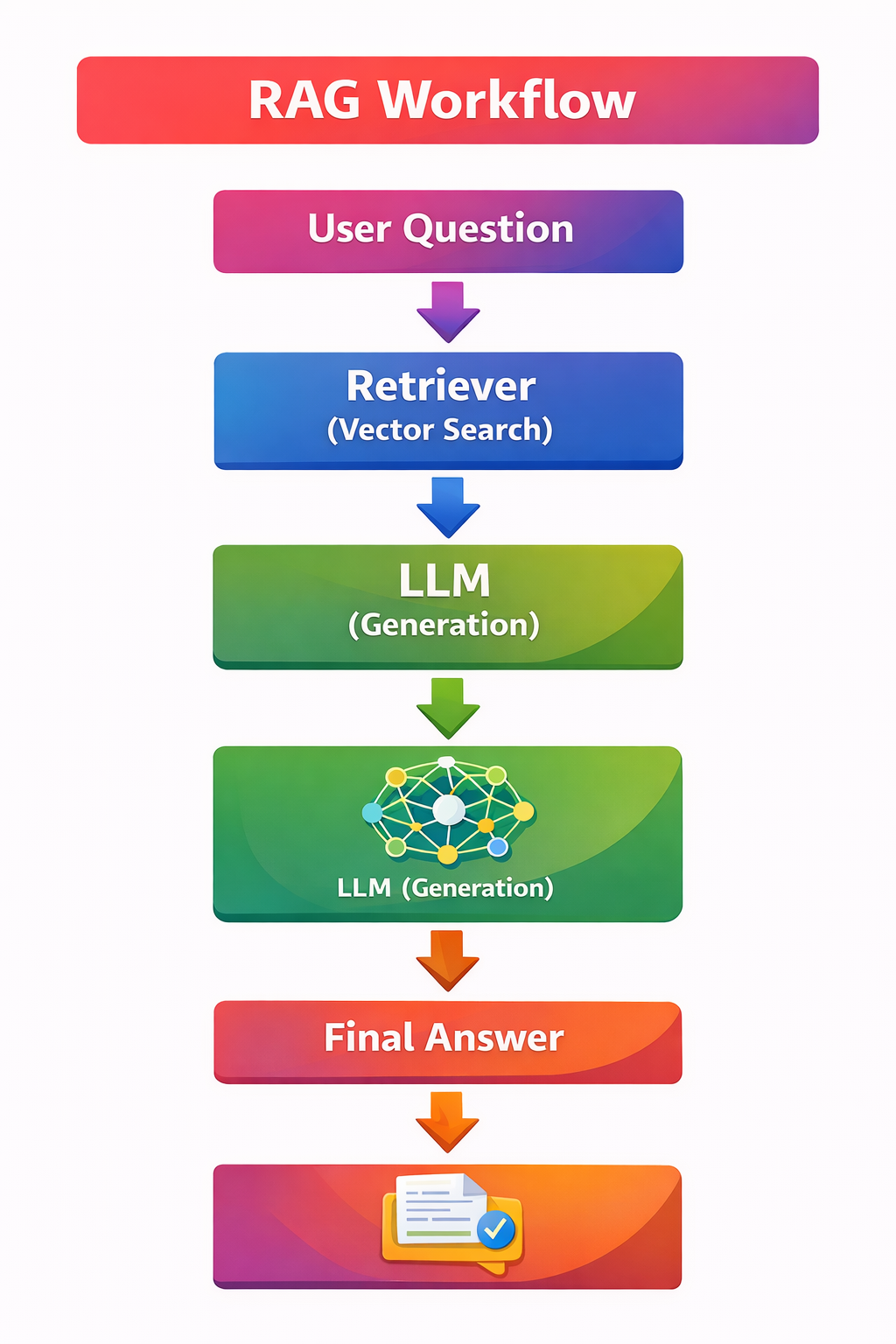
What is RAG?
Definition: Retrieval Augmented Generation (RAG) improves LLM responses by retrieving relevant information from an external knowledge base before generating an answer.
In simple words:
LLM + your data = accurate answers
Why RAG is Needed
Problem 1 — Hallucination
LLMs may generate incorrect answers when data is missing.
Example:
- Model trained until Aug 1
- You ask about Aug 15 event
- model invents an answer
Problem 2 — No Access to Private Data
Your company data may include:
- HR policies
- finance documents
- internal SOPs
- not in LLM training data
- fine-tuning is expensive
First Solution: Fine-Tuning
What is Fine-Tuning? Fine-tuning means retraining a pretrained model on domain-specific data.
Goal: Add domain knowledge to the model.
Example Analogy
- Engineering degree → pretraining
- Company training → fine-tuning
Problems with Fine-Tuning
- Expensive
- Training large models costs money
- Requires expertise
- Needs ML engineers and infrastructure
- Hard to update
- New data means retraining again
- Not ideal for frequently changing data
So we need a better solution.
RAG Solves Both
- reduces hallucination
- uses real-time and private data
- avoids expensive fine-tuning
- updates instantly when data changes
Traditional LLM vs RAG
Traditional LLM Flow
User Query → Prompt → LLM → Answer
Problems:
- outdated knowledge
- hallucinations
- no private data
RAG Flow
User Query → Retrieve relevant data → Provide context to LLM → Generate accurate answer
RAG Architecture Overview
RAG has two main pipelines:
- Data Injection Pipeline
This pipeline prepares documents and stores them in a searchable format.
- Retrieval Pipeline
This pipeline retrieves relevant information when a user asks a question.
Pipeline 1: Data Injection Pipeline
Step-by-step:
- Data Sources
- HTML
- Excel
- SQL
- JSON
- text files
- Data Parsing
- Extract readable text
- improves retrieval accuracy
- handles structured and unstructured data
- Chunking (Very Important)
- Large documents are divided into smaller chunks
- fits LLM context size
- improves retrieval precision
- reduces memory usage
- Embeddings
- Convert text into vectors
- allows similarity search
- provides semantic understanding
- OpenAI
- Gemini
- Hugging Face
- open-source models
- Vector Database
- Stores vector embeddings
- ChromaDB
- FAISS
- Pinecone
- Weaviate
Result: You now have a searchable knowledge base.
Retrieval Pipeline
When a user asks a question, the retrieval pipeline works as follows:
- Convert query into embedding
- Search the vector database
- Retrieve the most relevant context
- Send context and prompt to the LLM
- LLM generates the final answer
Example
User asks: What is leave policy?
System:
- finds HR policy chunk
- sends it to the LLM
- returns accurate answer
Core RAG Formula
Workflow
User Query
   ↓
Embedding
   ↓
Vector Search
   ↓
Relevant Context
   ↓
Prompt + Context
   ↓
LLM Response
Key Concept: Context Augmentation
Context augmentation means adding retrieved context before the LLM generates the response.
- adds retrieved context
- guides LLM response
Without context, the model may hallucinate. With context, the answer becomes more accurate.
Document Structure (LangChain Concept)
Documents usually contain two important parts:
- Page Content: Actual text
- Metadata: Extra information
Metadata may include:
- file name
- author
- page number
- source
Why metadata matters?
- You can filter search by author
- You can filter search by file type
- You can filter search by date
Chunking Strategies
Chunking divides documents into smaller pieces.
Common methods:
- fixed-size chunks
- semantic chunking
- recursive splitting
Benefits:
- better retrieval
- efficient embedding
- context optimization
Embeddings Explained
Embeddings convert text into numbers.
Example: "machine learning" → [0.12, 0.98, …]
They are used for:
- cosine similarity
- semantic search
Vector Database Role
A vector database stores embeddings for fast retrieval.
It supports:
- similarity search
- filtering
- ranking
RAG Reduces Hallucination
RAG does not eliminate hallucination fully.
But:
- if data exists, it improves answer accuracy
- if data is missing, the LLM may still hallucinate
Real-World Example
Perplexity AI uses RAG for:
- web retrieval
- context summarization
- citation-based answers
Implementation Workflow
- Phase 1 — Basic
- build simple RAG
- load documents
- chunk and embed
- Phase 2 — Intermediate
- modular code
- vector search
- context retrieval
- Phase 3 — Advanced
- agentic RAG
- optimization
- context engineering
Modular RAG Architecture
Module Structure
📁 RAG System
├── 📁 Data Loader
├── 📁 Chunk and Embedding Module
├── 📁 Vector Store Module
├── 📁 Retriever
└── 📁 LLM Generator
Production systems usually split RAG into multiple modules:
- Data Loader: Reads documents
- Chunk and Embedding Module: Processes text
- Vector Store Module: Stores embeddings
- Retriever: Fetches context
- LLM Generator: Creates answers
Optimization Topics Covered
The course also discusses:
- semantic chunking
- context engineering
- embedding selection
- retrieval accuracy improvements
Why RAG is Important Today
According to industry trends, many enterprise AI applications now use RAG.
Common use cases include:
- enterprise chatbots
- document Q&A systems
- legal research
- developer assistants
- knowledge base search