INSERT INTO statement in BigQuery
The INSERT INTO statement in SQL is used to insert new rows of data into a table. There are several ways to use this statement depending on the amount and type of data we are inserting.
The INSERT query in SQL can be used to add new rows of data to an existing table. Insert statements can be used to add values for specific columns or for all columns of a table. We must be careful about the order of columns and data types while inserting values.
Syntax 1: Insert with Column Names
In this syntax, we explicitly specify the column names and the values to be inserted.
SQL Syntax
INSERT INTO `project_name.dataset_name.table_name`
(column1, column2, column3, ...)
VALUES (value1, value2, value3, ...);
Note: If we change the order of column names, their corresponding values must follow the same order.
Syntax 2: Insert Without Column Names
If we are inserting values into all columns of the table, we can omit the column names. The values must be provided in the same order as the table schema.
SQL Syntax
INSERT INTO `project_name.dataset_name.table_name`
VALUES (value1, value2, value3, ...);
Syntax 3: Insert Multiple Records
Multiple rows can be inserted in a single INSERT statement by separating each row with a comma.
SQL Syntax
INSERT INTO `project_name.dataset_name.table_name`
(column1, column2, column3, ... columnN)
VALUES
(value1, value2, value3, ... valueN),
(value1, value2, value3, ... valueN),
(value1, value2, value3, ... valueN);
Example: Create Employees Table
SQL
CREATE TABLE `ashishcoder.Coding_Dataset.employees` (
  EmployeeID INT64,
  Name STRING,
  Age INT64,
  Salary INT64,
  Department STRING,
  Gender STRING
);
Insert a Single Record
SQL
INSERT INTO `ashishcoder.Coding_Dataset.employees`
(employeeid, name, age, salary, department, gender)
VALUES
(1, 'Ashish', 24, 25000, 'Electrical', 'M');
Insert Multiple Rows
We can insert multiple rows in a single INSERT INTO statement by separating each row with a comma.
SQL
INSERT INTO `ashishcoder.Coding_Dataset.employees`
VALUES
(2, 'Kirshan', 32, 30000, 'Electrical', 'M'),
(3, 'Anjali', 20, 25000, 'Electronics', 'F'),
(4, 'Manjulika', 30, 15000, 'Electrical', 'F'),
(5, 'Katrina', 37, 18000, 'Computer', 'F'),
(6, 'Esha', 37, 20000, 'Computer', 'F'),
(7, 'Ankita', 20, 9000, 'Electronics', 'M'),
(8, 'Meenakshi', 30, 15000, 'Computer', 'F'),
(9, 'Alia', 37, 16000, 'Electronics', 'F');
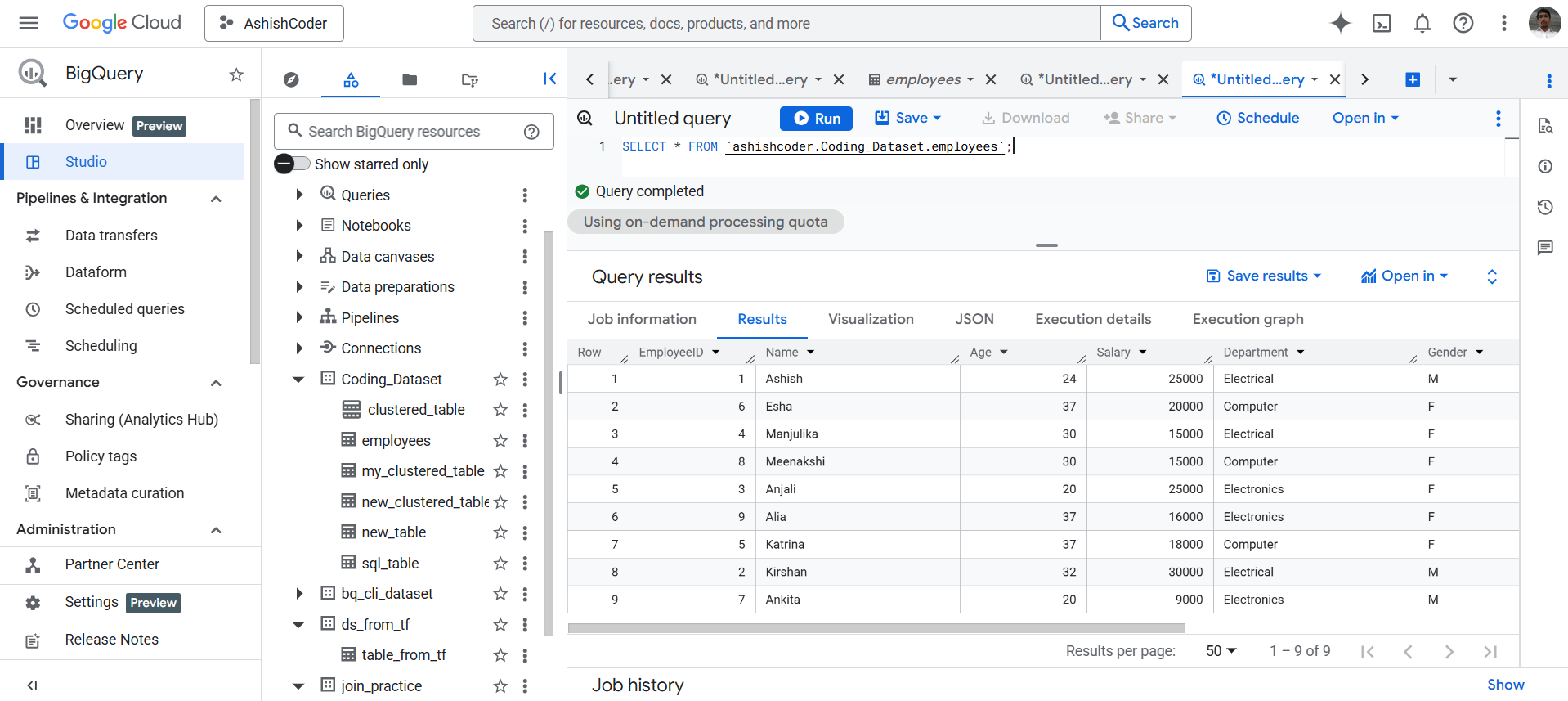
To verify the inserted data, execute the following query.
SQL
SELECT * FROM `ashishcoder.Coding_Dataset.employees`;
The output of the above query is shown below: