Delete a Dataset in BigQuery
Deleting a dataset in BigQuery removes the dataset itself and all objects contained within it, such as:
- Tables
- Views
- Materialized views
- Their underlying data
This operation is irreversible, so it should be performed with caution.
Delete a Dataset Using the BigQuery Console (UI)
Follow the steps below to remove a dataset using the BigQuery user interface:
- Go to the BigQuery page here.
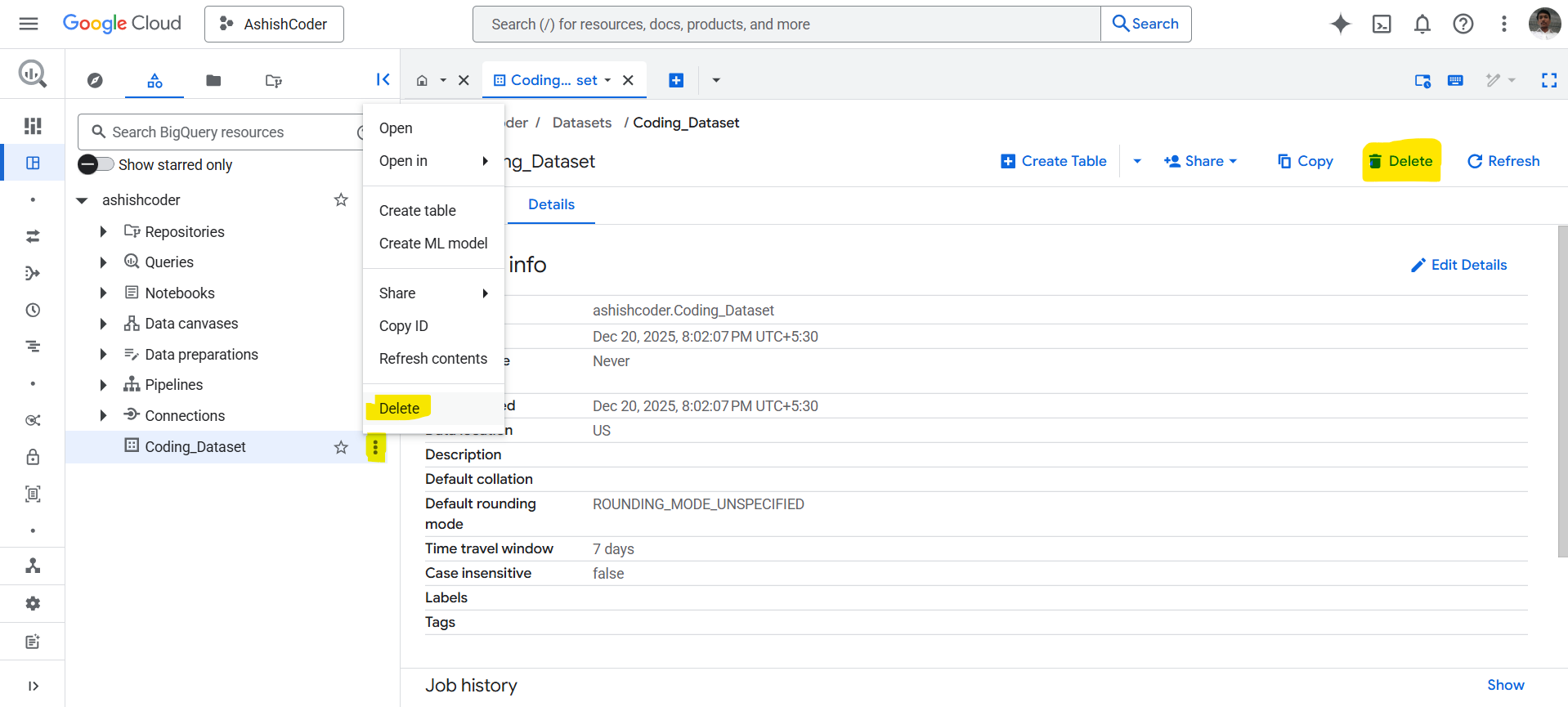
- In the Explorer pane, expand your project and select the dataset.
- Click on the three dots next to the dataset name and then click Delete.
- In the Delete dataset dialog, type delete into the field and then click Delete.
When deleting a dataset using the bq command-line tool, the -r flag must be used to delete all tables and views inside the dataset.
Delete Dataset Using SQL
We can also delete a dataset by using an SQL statement.
- Go to the BigQuery page here.
- In the query editor, enter the following statement.
SQL
DROP SCHEMA IF EXISTS mydataset;
By default, this command deletes only an empty dataset. To delete a dataset along with all its contents, use the CASCADE keyword.
SQL
DROP SCHEMA IF EXISTS mydataset CASCADE;